Track EPA 608 & License Expirations
Add technician credentials to PocketTech and get automatic reminders at 90, 30, 7, and 0 days before any license or certification lapses.
PocketTech’s compliance tracking keeps every technician credential, HVAC and state licenses, EPA 608 proof, NATE, manufacturer certs, even driver’s licenses, on one dashboard, with reminders that fire before anything lapses.
Step 1, Add a credential to a technician
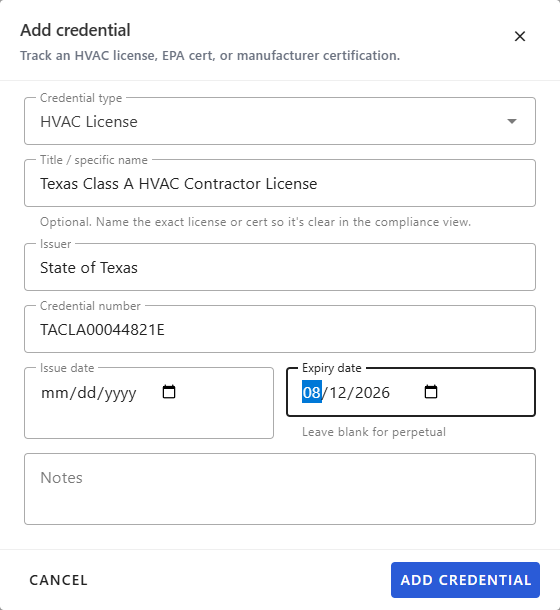
Open the technician from Team → Users, scroll to the Credentials section, and click Add credential. Pick the credential type (HVAC License, EPA 608 Universal or Type I/II, NATE, Manufacturer Cert, Driver’s License, and more), name the specific license, and add the issuer and credential number. Set the issue date and, for anything that expires, the expiry date, leave expiry blank for a credential that never lapses.
Step 2, Let the reminders do the watching
Once a credential has an expiry date, PocketTech automatically notifies both the technician and the office at 90, 30, 7, and 0 days out. You don’t configure anything per credential, the cadence runs in the background.
Step 3, Work the compliance dashboard
Open Compliance (under Operations) for a company-wide view. The summary strip counts everything expiring in 30 and 7 days, anything already expired, plus licenses at risk, open permits, and overdue inspections.

Use the Expiring within (days) filter to widen or narrow the window, and filter by tech to focus on one person. New credentials appear here as soon as you add them.
Step 4, Renew and reset
When a credential is renewed, open it from the technician’s Credentials list and update the expiry date. The reminder cycle resets automatically and starts fresh for the new period.
What’s next
- Read the background: EPA 608 certification renewal guide.
- See the full permit & credential compliance feature.
Frequently asked questions
Does EPA 608 certification expire?
The EPA Section 608 certification itself does not expire, it's issued for life once a technician passes the exam. What lapses is your documentation of it and the state and local licenses that stack on top of it. PocketTech tracks all of them so nothing slips through.
Who gets the renewal reminders?
Both the technician and the office receive reminders at 90, 30, 7, and 0 days before a credential's expiry. That way it's never one person's job to remember, and a reminder can't be missed because someone was out.
What happens when I renew a credential?
Update the expiry date on the credential record and the reminder cycle resets automatically. You'll start fresh at the 90-day threshold for the new period, no need to re-create the record.