Finish Setting Up Your Workspace
After the setup wizard, your PocketTech dashboard shows a first-week checklist, vendors, line items, trucks, and forms, that gets you ready to run real jobs.
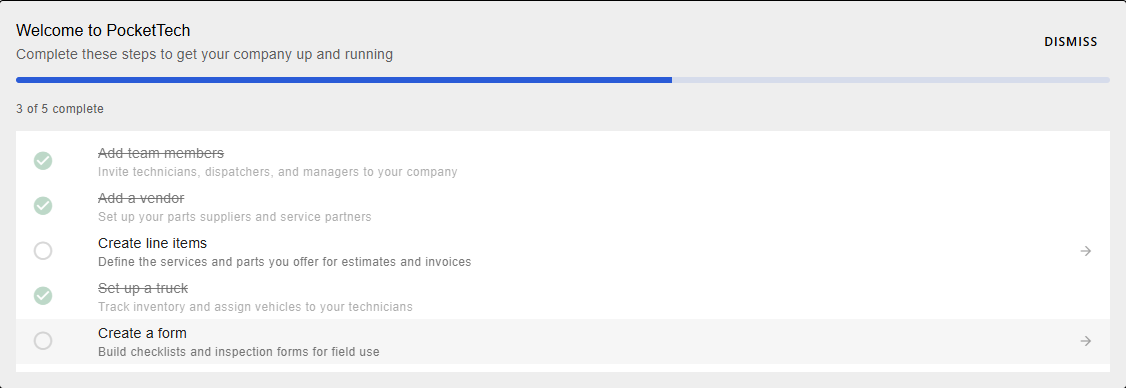
When you finish the setup wizard and land on your dashboard, PocketTech shows a short checklist of the things worth doing in your first week. None of them are required to log in and look around, but each one makes your estimates, dispatching, and inventory work the way they should once real jobs start coming in. Here’s what each item sets up, and why it’s worth the few minutes.
Before you start
You’ll want to be signed in as an admin or manager, most of these screens are management tools. If you invited your team during the wizard, the first item may already be checked off.
Step 1, Add team members
If you skipped team invites during setup, this is where to catch up. It opens the Users screen, invite technicians, dispatchers, and managers, and each person sets their own password from an email. The item checks off automatically once your company has more than just you.
Step 2, Add a vendor
Set up the suppliers and service partners you buy parts from. Vendors power purchase orders and feed material costs into each job’s profit and loss, so your reporting reflects what jobs actually cost, not just what they billed.
Step 3, Create line items
Define the services and parts you sell. Line items are the building blocks of every estimate and invoice, which makes this the highest-leverage item on the list. If you picked your trades in the wizard, you already have a tailored pricebook to build on rather than a blank slate.
Step 4, Set up a truck
Add your vehicles so you can track van inventory and assign trucks to technicians. Low stock surfaces on your dashboard, so you restock before a tech reaches a job without the part they need.
Step 5, Create a form
Build the checklists and inspection forms your techs complete in the field, maintenance checklists, safety sign-offs, install photo sets, whatever your work calls for. Forms attach to jobs so the paperwork lives with the record instead of on a clipboard.
What’s next
- Create your first job now that your pricebook and team are in place.
- Build your dispatch board to run the whole day from one screen.